Atlassian Tools
How to Bulk Export Confluence Pages to Markdown (Pages, Page Trees and Entire Spaces)
•
min read


The easiest way to bulk export Confluence pages to Markdown is Markdown Exporter for Confluence by Narva Software, which exports a page tree or an entire space as a ZIP of Markdown files with hierarchy, images and attachments preserved.
This guide shows how to export Confluence to Markdown with Markdown Exporter for Confluence by Narva Software. It covers why Confluence Cloud has no Markdown option among its four native export formats, according to Atlassian Support. It then compares three methods side by side, so you can pick the right one to migrate Confluence to Markdown for Git, a docs site or an AI pipeline.
Does Confluence export to Markdown natively?
No. Confluence Cloud exports to PDF, Word, HTML and XML, but not Markdown. Atlassian's own export documentation lists Word and PDF for single pages and HTML, XML and PDF for whole spaces. Markdown is not on either list.
This gap matters more now that most teams run Confluence in the cloud. Atlassian ended support for its Server products on 15 February 2024, which moved a large share of self-hosted customers to Cloud, where server-side export plugins no longer run.
Exporting one page is simple. Exporting an entire Confluence space to markdown is possible. Exporting hundreds is where the work piles up. A bulk export has to solve four problems at once:
Hierarchy
Confluence stores parent–child page links in its database, not as folders. A flat pile of .md files loses that structure.
Image paths
Embedded images point to Confluence attachment URLs. Each link must be rewritten to a local file path.
Attachments
PDFs, spreadsheets and diagrams need to be downloaded and placed next to the pages that use them.
Macros
Info panels, code blocks, expand sections and Jira issue lists are stored as custom XML tags that generic converters do not understand.
3 ways to bulk export Confluence pages to Markdown
Dedicated exporter app is the easiest way to bulk export Confluence pages to Markdown for most of the teams. Markdown Exporter for Confluence by Narva Software runs inside Confluence Cloud and produces a ready-to-use ZIP.
REST API + converter. A script pulls each page in storage format from the Confluence REST API, then converts it with Pandoc or the JavaScript library Turndown.
Space HTML/XML export + converter. You run Confluence's built-in space export, unzip the HTML, and batch-convert it with Pandoc or an open-source CLI.
Three methods to export Confluence to Markdown, compared
Method | Coding required | Typical setup time | Keeps hierarchy | Keeps attachments | Best for |
|---|---|---|---|---|---|
Dedicated exporter app | None | Minutes | Yes, built in | Yes, built in | Teams that want a clean result today |
REST API + Pandoc or Turndown | Yes (Python, Node or shell) | Days to weeks | Only if you code it | Only if you code it | Automated, recurring pipelines |
HTML/XML export + Pandoc | Light scripting | Hours to days | Partial (flat HTML files plus an index) | Partial (links need rewriting) | One-off archives |
If you are not sure which way is the right for your team, see the article Markdown Exporter or DIY Pipeline? Choosing How to Export Confluence to Markdown, which covers all DIY options in detail and shows how it compares with Markdown Exporter for Confluence by Narva Software.
How to bulk export Confluence pages with Markdown Exporter for Confluence
Markdown Exporter for Confluence by Narva Software exports a page tree or a full space in one action and returns a single ZIP file. A 500-page space exported one page at a time takes 500 separate downloads; Bulk Export turns that into one.

Markdown Exporter for Confluence by Narva Software
Runs on Confluence cloud.
Action: Bulk Export
Output: Markdown files plus images and attachments, in a ZIP
Structure: Page hierarchy preserved as folders
Export a confluence page tree to Markdown
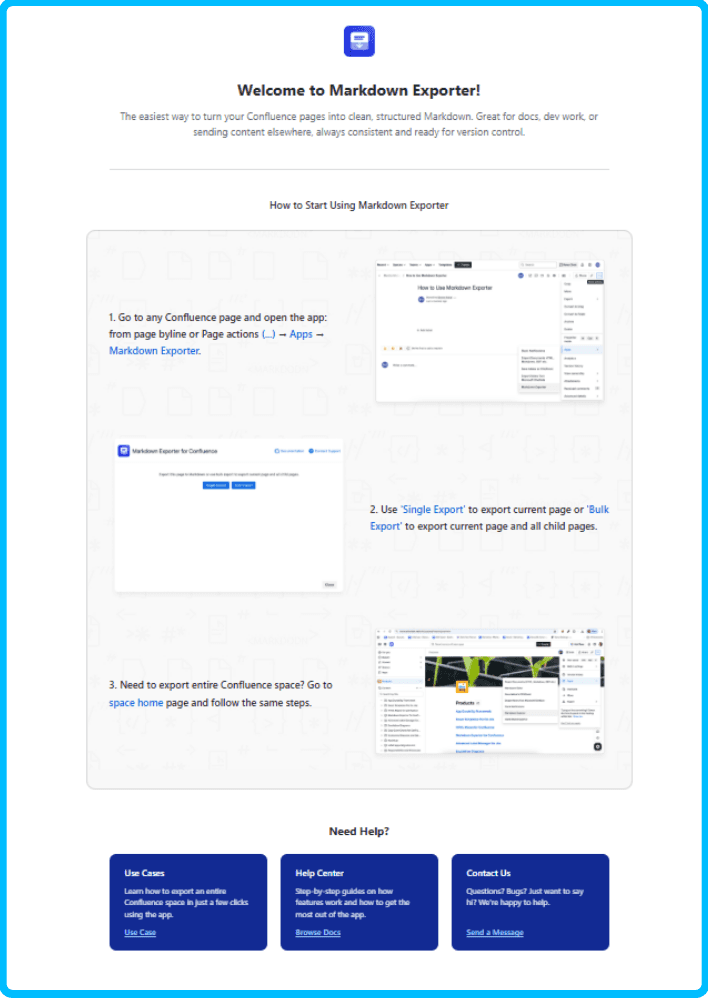
Install Markdown Exporter for Confluence from the Atlassian Marketplace. A site admin approves the install once.
Open the parent page of the tree you want to export.
Open the page's ••• menu and choose the Markdown export option.
Select Include child pages so every descendant page is part of the export.
Click Export and download the ZIP.
Export an entire Confluence space to Markdown
Open the space you want to export.
Start Bulk Export from the app.
Select the space root so all pages and child pages are included.
Keep images and attachments switched on.
Run the export and download the Confluence Markdown ZIP export.

Export an Entire Confluence Space in one Bulk Export
Markdown Exporter For Confluence exports a page tree or an entire space in one Bulk Export, keeps the hierarchy as folders, and packages images and attachments in the same ZIP
What is inside the ZIP
The folder structure mirrors the page hierarchy in Confluence. Each page becomes a .md file, and each parent page also becomes a folder for its children:
engineering-handbook/
├── engineering-handbook.md
├── onboarding/
│ ├── onboarding.md
│ ├── dev-environment-setup.md
│ └── attachments/
│ └── vpn-config.pdf
├── architecture/
│ ├── architecture.md
│ ├── service-map.md
│ └── images/
│ └── service-map.png
└── runbooks/
└── incident-response.md
Inside each file you get GitHub Flavored Markdown (GFM): headings, tables, fenced code blocks with language tags, and relative links to local images and attachments. Diagrams export as image files next to the page that shows them.
For security-conscious teams, processing runs on the client side, in the browser session of the person running the export. Page content does not pass through a third-party conversion server.
What to do with your Markdown export
A Markdown export turns Confluence content into plain-text files that any Git host, docs generator or AI pipeline reads directly. Markdown was designed for exactly this kind of portability.
“The overriding design goal for Markdown’s formatting syntax is to make it as readable as possible.”
John Gruber, creator of Markdown, Markdown: Syntax, Daring Fireball
Confluence to GitHub Markdown
Commit the export to a GitHub or GitLab repository to get version history, pull-request reviews and diffs for your docs. GitHub reported more than 100 million developers on its platform in January 2023 (GitHub blog), and GitHub renders .md files natively.
Static documentation sites
Docusaurus, MkDocs and Hugo all build sites from Markdown folders. The page-tree folders from the export map straight onto their sidebar navigation.
Confluence Markdown for RAG and LLM ingestion
Retrieval-augmented generation (RAG), introduced by Lewis et al. at Facebook AI Research in 2020, grounds a language model in your own documents. Markdown headings give clean chunk boundaries, and plain text carries no HTML markup to strip before embedding.
Knowledge-base migration
Notion, Obsidian, GitBook and many wiki tools import Markdown, which makes it a neutral hand-off format between systems.
Backup and archive
A Markdown ZIP stays readable in any text editor, decades from now, with no Confluence licence required.
Frequently Asked Questions
How do I bulk export Confluence pages to Markdown?
The simplest way is to use Markdown Exporter for Confluence by Narva Software, a Confluence Cloud app that exports multiple pages, a page tree or an entire space to Markdown in one step. It downloads a ZIP of .md files that keeps the page hierarchy, images and attachments. Alternatively, you can script an export with the Confluence REST API and Pandoc, which requires custom development.
Can I export an entire Confluence space to Markdown?
Yes. Confluence has no native Markdown export, but Markdown Exporter for Confluence by Narva Software can export a full space using its Bulk Export option. The output is a ZIP of Markdown files organised in folders that mirror the space's page tree, with images and attachments included.
Does Confluence have a built-in Markdown export?
No. Confluence Cloud natively exports to PDF, Word, HTML and XML, but not Markdown. To get Markdown you need a Marketplace app such as Markdown Exporter for Confluence by Narva Software, or a conversion workflow using the REST API or an HTML/XML export plus Pandoc.
Should I use a Markdown exporter app or the REST API and Pandoc?
Use a dedicated exporter if you want a no-code, repeatable export that already handles hierarchy, images and attachments. Use the REST API and Pandoc if you need full control over conversion, want to automate exports in a pipeline, and have engineering time to build and maintain the scripts.
Does a bulk Markdown export keep the Confluence page hierarchy?
With Markdown Exporter for Confluence by Narva Software, yes: exported files are placed in folders that follow the original page tree. With DIY API or Pandoc workflows, you must rebuild the hierarchy yourself from page ancestry data.
What can I do with Confluence pages exported to Markdown?
Common uses are moving documentation into Git repositories on GitHub or GitLab, publishing with static site generators, feeding content into AI and RAG pipelines, migrating to another knowledge base, and keeping a portable Markdown archive of a space.

Nar is the founder of Narva Software and a former software developer with real-world experience using Atlassian tools. After facing the limitations of Jira and Confluence himself, he set out to build simple, effective apps that make teamwork easier. Today, his focus is on creating practical solutions that help teams work faster and smarter — and are trusted by companies around the world.