The Ultimate Guide to Jira Plugins
•
min read




Jira plugins — officially known as Jira apps — are modular software extensions that integrate with the Atlassian Marketplace to automate repetitive tasks, enforce data consistency, improve reporting visibility, and bridge the gap between native functionality and specific team requirements.
Most project managers struggle with Jira because they’ve built a system that gives their team the freedom to create chaos. Jira is powerful enough to handle virtually any workflow configuration, which creates a different problem.
Without structure, all that flexibility just means everyone invents their own definition of priority, your custom fields multiply faster than you can keep track, and your reporting dashboards end up reflecting wishful thinking rather than operational reality.
That’s where Jira plugins come in. They add the structure, automation, and enforcement layers that turn Jira’s flexibility into reliability.
This guide maps the Jira plugins ecosystem from the ground up. We’ll cover the shift from legacy plugins to modern cloud apps, show you how to vet the best plugins, and identify the Jira app categories that actually return time to your team instead of adding complexity to your workflows.
What are Jira plugins? and how they differ from Jira apps
Jira plugins are apps that extend Jira’s native capabilities beyond what ships out of the box. Available through the Atlassian Marketplace, plugins cover everything from advanced workflow logic and automated field validation to external tool integrations and reporting.
While veteran admins still say “Jira add-ons” or “Jira plugins” out of habit, the Atlassian ecosystem went through an overhaul that matters more than the terminology suggests.
Historically, a Jira plugin was a package of code installed directly into your server or data center instance’s backend. These ran inside the application’s runtime, which gave you deep control but also meant one badly behaved plugin could crash the entire instance.
As Atlassian moved toward cloud-first architecture, they introduced Jira apps. Modern cloud apps are vendor-hosted and connect via secure frameworks like Atlassian Connect or Forge. They “talk” to Jira through permission-scoped APIs instead of living in your server’s memory and competing for resources with your actual workflows.
If you’re choosing tools today, understanding the difference between Jira apps and plugins can determine which documentation you follow, which security standards you apply, and whether your vendor support team can actually support you if things break.
The evolution: Jira apps vs plugins vs add-ons
Term | Period | Context |
Jira plugin | Legacy / technical | Code executed inside Jira. High control but high maintenance risk. |
Jira add-on | Transitional | A 2012 marketing term to make the Marketplace feel accessible to non-devs. |
Jira app | Modern / official | Current standard. Cloud apps connect via APIs and are isolated from the core runtime. |
Why Jira plugins are critical for the productivity of most agile teams
Jira handles the basics out of the box, but at some point, every high-growth agile team hits the same wall: what used to take minutes now takes hours, and manual management starts feeling repetitive in ways that compound over time.
Jira plugins then become the scaffolding that transforms Jira from a flexible ticket tracker into an actual source of truth your team can scale on without constant manual intervention.
Native Jira is powerful until you need logic and capabilities that standard rules can’t handle. A dedicated Jira workflow plugin manages the complex scenarios that make basic automation buckle.
Atlassian’s own data shows that automation across Jira and Confluence accelerates work by eliminating manual handoffs. Canva even reported saving over 150 hours every month, leaning hard on automation to manage massive ticket volumes without sacrificing speed or accuracy.
A Jira dashboard can look polished while communicating absolutely nothing useful. This happens when your reports pull from inconsistent data: labels that mean five different things depending on who created the ticket, or stories that skip half their acceptance criteria because “we’ll add that later” becomes permanent.
Plugins fix this upstream by enforcing consistency at the point of entry, standardized naming conventions, mandatory field structures, and descriptions that actually describe. Once every issue follows the same system, you can start making decisions based on data you can trust.
Context switching kills focus. Jumping between a time-tracker, a CRM, three spreadsheets, and Jira just to figure out whether a feature shipped burns time that adds up across your entire team.
Plugins let Jira integrate directly with external applications like Salesforce, GitHub, or Slack, centralizing the information your team needs without forcing them to reconstruct context across different tools.
The real value of extending Jira lies in trust, not just speed. When every issue follows a defined pattern, your sprint reports, velocity charts, and automation triggers become reliable because the underlying data is uniform.
That reliability compounds over time, turning Jira into a foundation your organization can build on as complexity scales and stakes get higher.
How to (properly) choose the right Jira plugin for your team
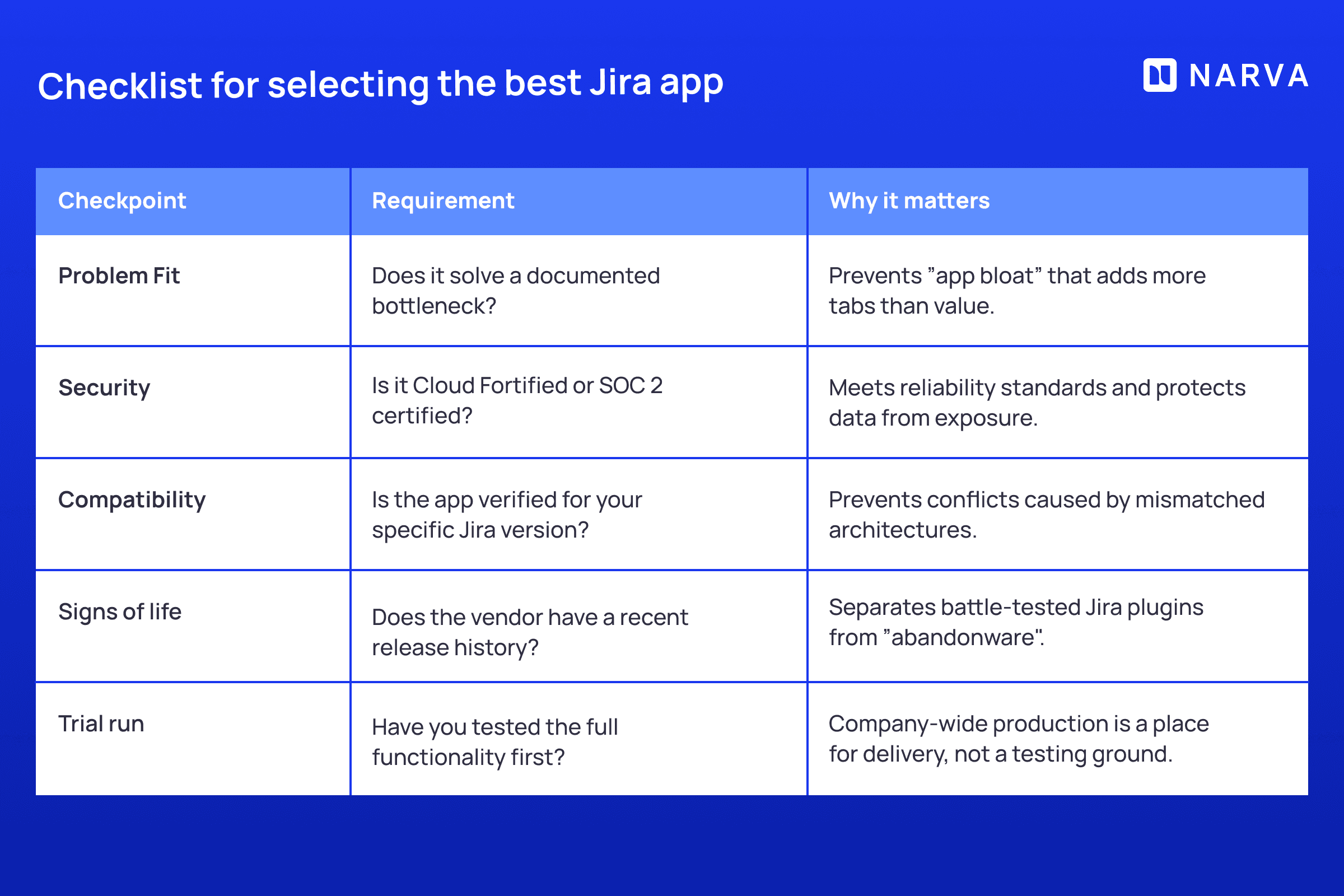
The Atlassian Marketplace has thousands of apps, and “app bloat” is a real risk. Teams start with good intentions and end up with a dozen tools that not many fully understand (or even use effectively). That’s why choosing the best Jira plugins requires a strategic approach.
Identify workflow pain points
Don’t install a Jira plugin because it looks “dope” or someone mentioned it in a Slack thread. Start with a concrete, painful bottleneck like bugs that consistently lack reproduction steps, or sprint planning meetings that drag on because half your tickets are missing essential context. If native Jira can solve it with a few simple rules, solve it that way. If it can’t, then start browsing.
Check compatibility with your Jira version
Before clicking “install”, verify the app works with your specific Jira version. Falling behind on Jira updates increases the odds of compatibility issues that traditionally surface at the worst possible time. Version conflicts are easier to prevent than to fix.
Evaluate support and updates
Good Jira apps show visible signs of life. Check the release cadence on the Marketplace listing — recent updates hint at an actively maintained product that won’t leave you stranded. Make sure to review the vendor’s documentation to assess support quality.
Cost vs. benefit
Evaluate pricing against the expected time savings. Many top Jira add-ons offer free tiers for small teams (up to 10 users), which makes them perfect for pilot projects where you can test before committing a budget. One week of actual usage reveals more than any feature list or product page ever will.
Your Checklist for selecting the best Jira app
Top types of Jira plugins every agile team should know about
To navigate thousands of Atlassian Marketplace options efficiently, organize your needs into these functional groups:
Jira workflow plugins
Jira admins can improve Jira workflow using plugins.These tools add advanced conditions, validators, and post-functions, ensuring work only advances when the data is accurate and specific requirements are met.
Jira reporting and analytics plugins
When native Jira charts can’t answer the questions your stakeholders or clients keep asking, Jira reporting apps step in. They let you build custom reports, group issues by nearly any field combination, and visualize data without having to export to spreadsheets.
Jira automation plugins
A Jira automation app unlocks scripted logic and expression-based rules that go well beyond native limits. These are built for users who need to customize conditional branches, automate issue creation based on external triggers, or manage complex events that fire under specific conditions.
Jira time tracking and resource management plugins
These tools eliminate the pre-sprint scramble where everyone realizes nobody knows who’s working on what or whether the team has realistic capacity. They integrate timers and capacity planning charts directly into Jira’s UI, showing owners where effort is going and flagging bottlenecks early.
Jira collaboration plugins
Jira work collaboration apps bridge the gap between brainstorming and execution. They embed whiteboards, pull diagrams directly into tickets, and streamline task updates into Slack or Microsoft Teams, keeping the “thinking” and “doing” phases connected instead of siloed.
Some of the most useful Jira plugins for 2026
The “best” Jira app is the one that solves your specific problem without introducing new complexity or creating maintenance overhead.
We’ve curated a list of the most useful Jira apps for 2026 for agile teams in enterprises and startups alike. These plugins solve specific pain points while meeting the latest security, reliability, and support standards.
Here are some of them:
Timepiece — Time in Status for Jira
Highlights:
Exports to Excel, Google Sheets, Power BI, and easyBI
Detailed time-in-status, cycle time, and lead-time reporting
Supports scheduled reports and alerts for ongoing monitoring
Jira app details:
Developer: OBSS
Cloud Fortified; Partner Supported; Cloud Migration Assistance
Reports — Charts and Graphs for Jira Dashboard
Highlights:
Groups data by almost any Jira field
Highly flexible charting for dashboards
Configurable X/Y axes and aggregations
Jira app details:
Developer: Bloompeak
Cloud Fortified; Partner Supported
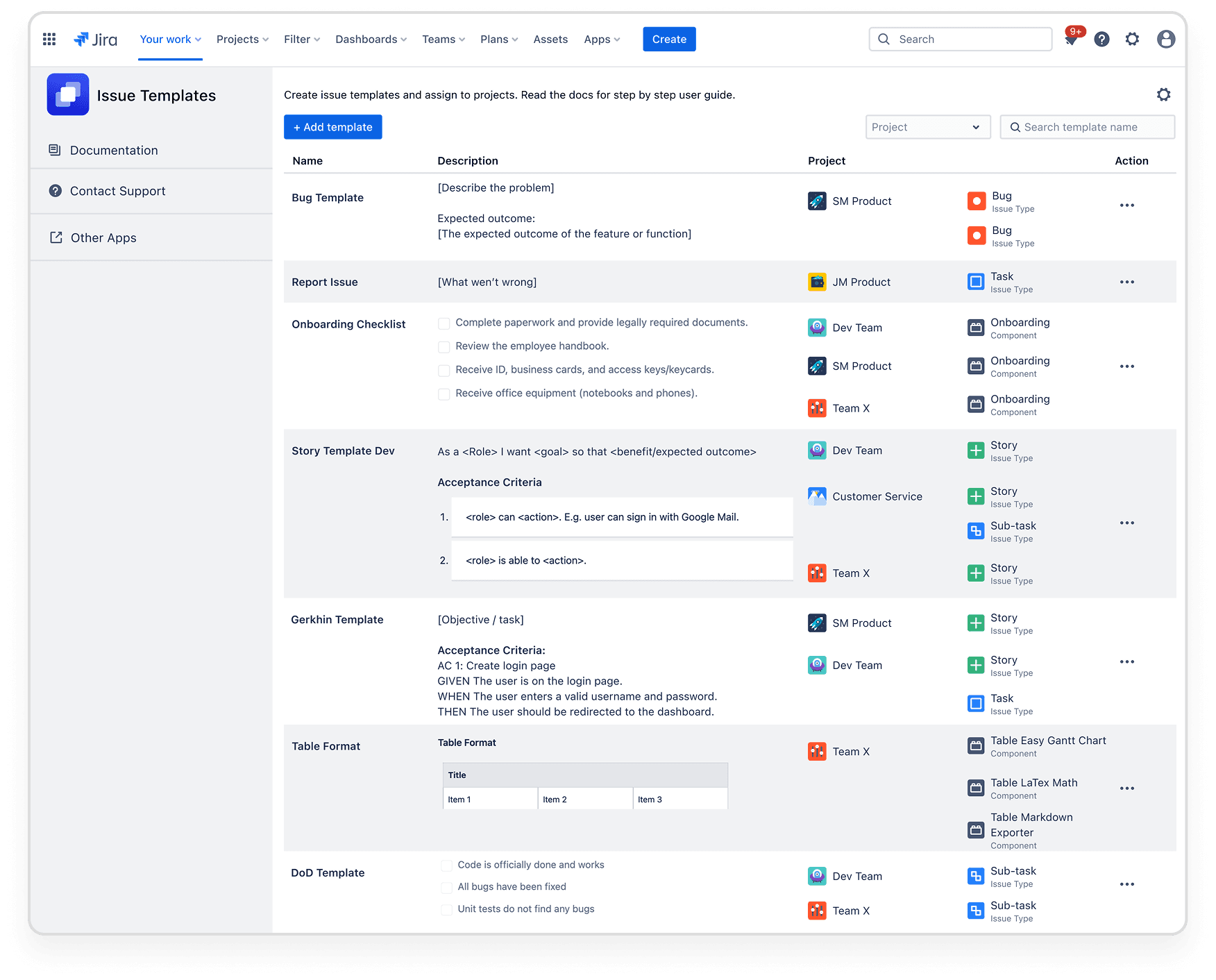
Issue Templates Pro — Issue Description Templates for Jira
Highlights:
Easy template creation without scripting or workflow hacks
Applies templates on the create screen for immediate consistency
Project admins can manage templates without involving Jira admins
Jira app details:
Developer: Narva Software
Cloud Fortified; Partner Supported
Get Issue Templates Pro from Atlassian Marketplace
Check out our full list of the best Jira plugins for 2026 for tools that tacke real-world workflow challenges.
Most useful Confluence plugins for Jira teams
Jira and Confluence work best when context flows seamlessly between planning and execution. For teams using both, the most useful Confluence plugins for Jira teams keep documentation and delivery moving in sync.
While we’ve curated a list of the five best Confluence apps for 2026, here are a few that stand out:
Refined for Confluence (Intranet, Themes & Navigation)
Highlights:
Applying brand colors, imagery, and logos to create a cohesive workspace that matches the corporate identity
Organizes spaces and pages into categories and sites, mapping content to a global nav bar and drop-down menus
Designs engaging landing pages and homepages using navigation, search, and content modules to highlight the most relevant info
Confluence app details:
Developer: Refined
Cloud Migration Assistance; Partner Supported
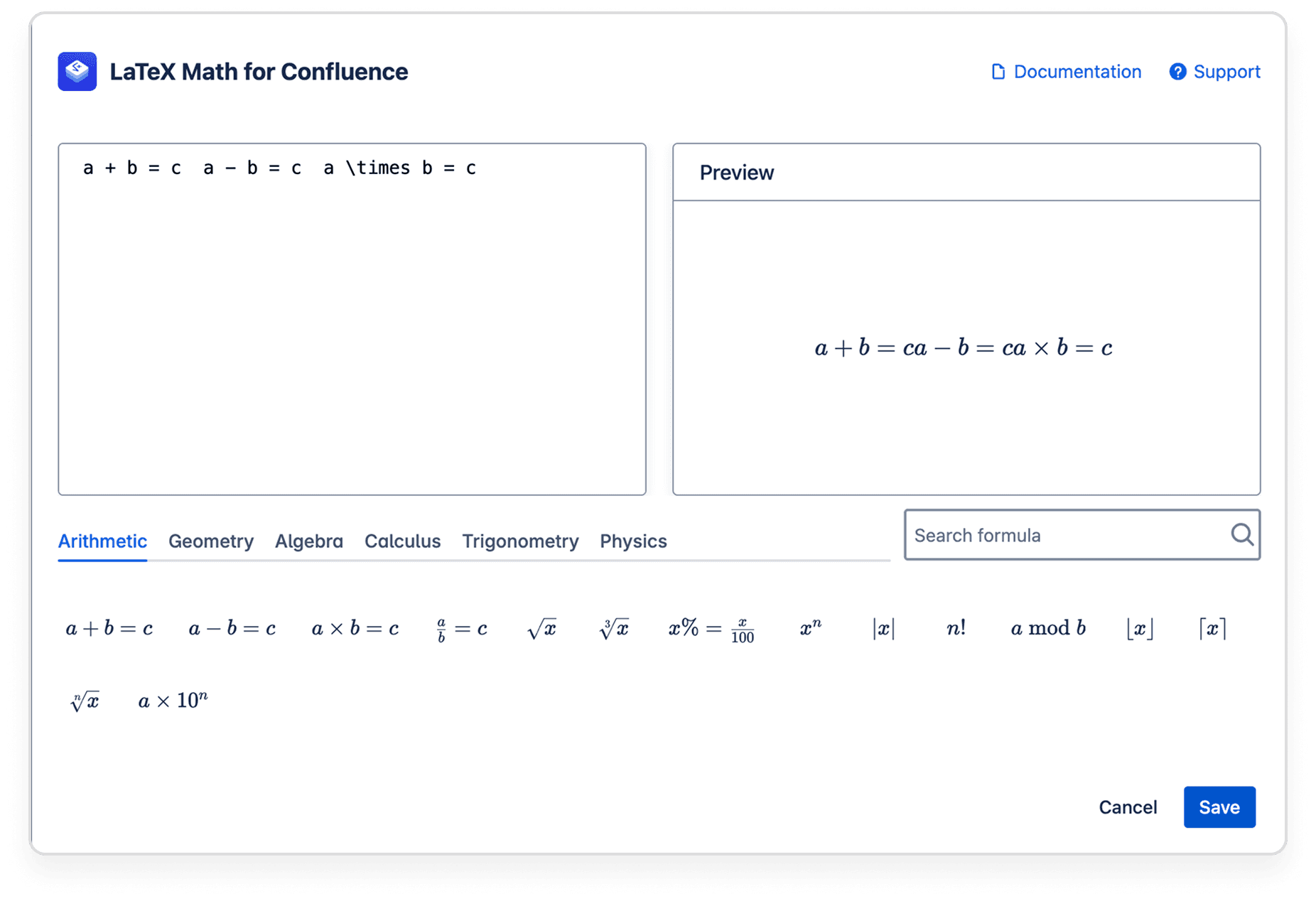
LaTeX Math for Confluence
Highlights:
Editor with instant preview and formula library to update code in seconds
Flexibility to render expressions as inline text or standalone blocks, better suited for complex formulas
Exports your pages without worrying about broken formulas; expressions are rendered properly using the MathJax library
Confluence app details:
Developer: Narva Software
Cloud Fortified; Partner Supported
Get LaTeX Math for Confluence from Atlassian Marketplace
Discover the full list of the best Confluence plugins for 2026 that improve collaboration and project tracking.
Tips for managing and maintaining your Jira plugins
Installing a Jira plug-in is step one. Long-term stability requires ongoing discipline to prevent the slow degradation where everything still technically works but nothing feels reliable anymore. Here are some tips on how to Install, Update, and Manage Jira Plugins Safely.
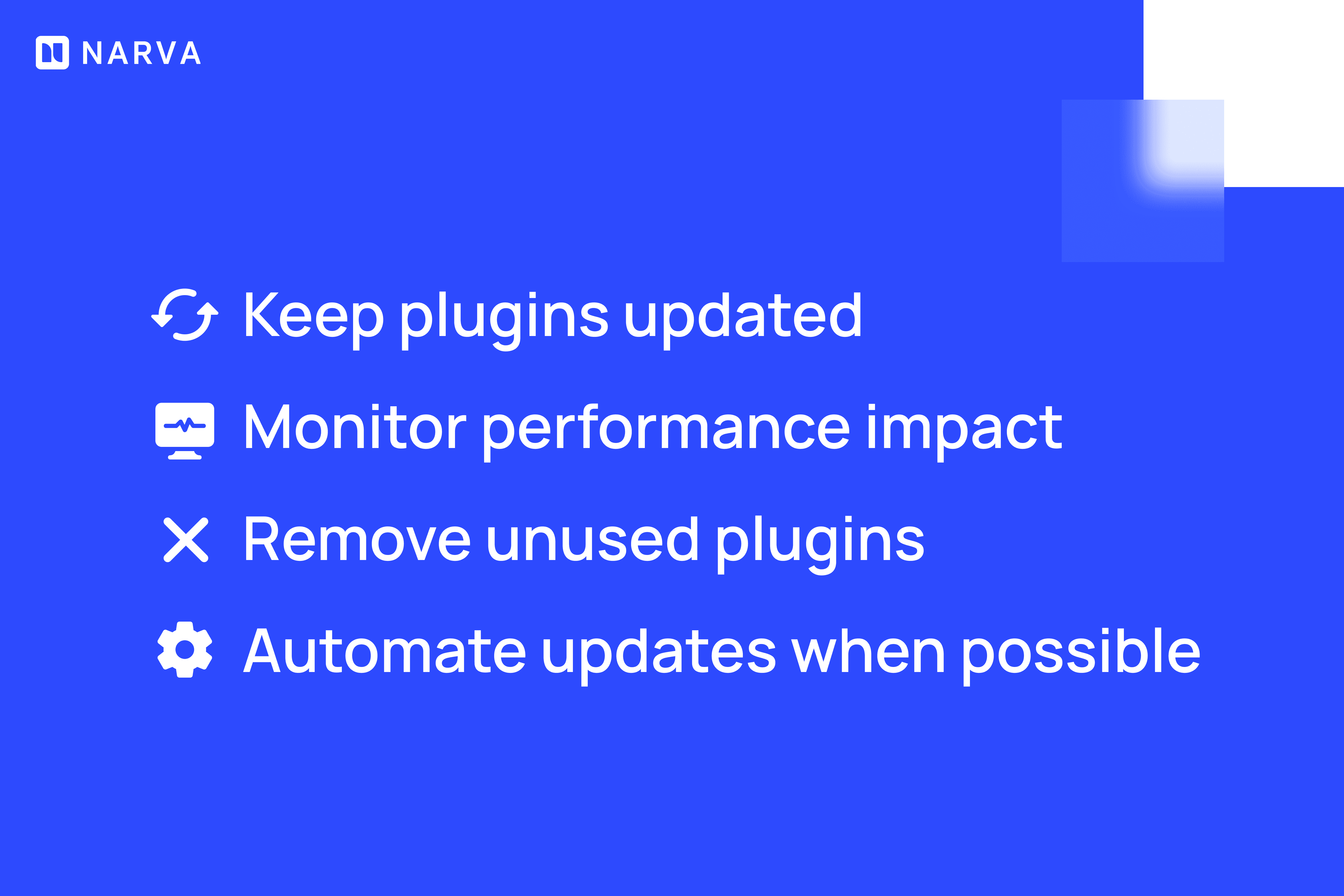
Updates often include critical security patches and bug fixes that prevent the find of issues that escalate quickly. If possible, read release notes for breaking changes, and test updates in a staging environment before adopting the update in production.
If Jira starts lagging or transitions feel sluggish, check your change log. Apps that degrade performance usually quietly drag down the entire instance until the entire team can feel things are moving slower than they used to.
Audit your Jira app list regularly. If nobody knows why a few Jira plugins exist, who uses them, or what problem they solve, they are just adding maintenance overhead and potential security exposure without delivering value.
In the cloud environment, many vendors handle updates automatically. But for data center deployments, schedule regular update cycles so you don’t fall behind and end up dealing with compatibility issues when you finally do upgrade.
Not everyone needs admin-level Jira plugin access. Limit Jira app management to designated owners who understand the implications of configuration changes. Unrestricted access is how some teams break automation that took weeks to build.

Frequently asked Jira plugin questions (FAQ)
What is the difference between a Jira plugin and a Jira app
Technically, “Jira plugins” are legacy components that ran inside Jira server or data center instances, while “Jira apps” are the modern standard for Jira cloud that connect via secure APIs. The Atlassian Marketplace now uses “Jira app” as the official term for both, but the underlying architecture differs.
How do I install a Jira plugin?
The safest path is through the Apps section in Jira’s admin menu. Search the Atlassian Marketplace and click “Install”. For custom or internal tools, admins can manually upload .jar or .obr files via the Manage Apps interface, though this requires more careful testing.
Can plugins break Jira workflows?
Yes. A poorly configured plugin or failed update can disrupt automation logic, slow down your instance, or conflict with existing custom fields. This is why testing in a staging environment can mean the difference between a smooth rollout and an urgent troubleshooting session.
What are the best free Jira plugins for small teams?
Many top-tier apps like Issue Templates Pro or Jira Workflow Toolbox offer free tiers for teams of up to 10 users. You can find many free Jira apps in various categories inside the official Marketplace, depending on the exact need or challenge you’re trying to solve.
You might also like...

This guide walks through building Confluence knowledge base from scratch