Atlassian Tools
Best Jira plugins for 2026: The Jira apps that solve real workflow problems
•
min read


The best Jira plugins in 2026 are the Marketplace apps that fix specific workflow gaps, while meeting strict security, reliability, and support standards. When people search for the best Jira apps, they aren’t really looking for a top 10 Jira plugins list. They want to stop the daily friction points that Jira admins and team leads quietly clean up after every sprint.
If you manage Jira, you’ve seen exactly how those friction points appear. A teammate installs a plugin without telling anyone, and automation rules mysteriously stop firing. Jira epics and stories are written in five different styles across seven projects, making planning feel like translation. Dashboards look polished but don’t match what’s actually going on. Time tracking happens in Jira, in side tools, and in spreadsheets.
These problems are manageable when they appear in isolation, but together they accumulate into a system that slows teams down more than it helps them.
If you want a broader perspective on how plugins extend Jira’s core capabilities, explore our complete guide to Jira plugins, where we break down how the ecosystem works and what to evaluate before installing anything new.
That’s why “What are the best 2026 plugins for Jira” is really shorthand for something more important: Which Jira apps genuinely remove friction without introducing new risks or extra work?
This article focuses on exactly that: why Jira plugins matter in 2026, what defines a “best Jira plugin”, which solve real problems, and how to choose them safely on Jira Marketplace — if you decide not to limit your search only to Spotlight apps.
Why the right Jira plugins make a bigger difference than you think
Jira covers a lot out of the box: workflows, boards, custom fields, reports, and automation. But most teams still wrestle with familiar issues:
➔ Epics, stories, and bugs are written in different styles across projects
➔ Required details for QA or support are often missing
➔ Time logs don’t line up with how work was planned
➔ Reports rely on inconsistent labels and fields
In short, the key benefits of using Jira and Confluence apps are that they extend Jira so you can:
Standardize structure — enforce consistent epics, stories, bugs, and service tickets
Improve automation — combine Jira’s built-in automation with app-specific capabilities
Integrate other tools — connect Jira with time tracking, business intelligence, or project management tools
Strengthen governance — align labels, fields, and workflows across all teams inside of your organization.
What "best Jira plugin" really means in 2026
There is no universal “top Jira apps” list that fits every team and every organization. But the most popular Jira apps tend to share a few traits:
They solve a specific, painful problem
Start from a concrete bottleneck, such as consistently missing critical fields on bug tickets, or having differently formatted epics across projects within the same team.
Any candidate app should have a clear story for how it fixes that, ideally with examples or screenshots on their Marketplace listing.They meet strong security and data-protection standards
If your Jira holds customer, employee, or financial data, plugins must pass the same scrutiny as any other core software:
➔ Prefer apps with the Cloud Fortified badge, as Atlassian reserves this for apps that meet higher standards for security, reliability, and support
➔ Look for vendors that clearly state SOC 2 certification, and explain how they protect your sensitive and mission-critical data
➔ Check their GDPR posture if you operate in or with the EU
Atlassian also runs a Marketplace Security Bug Bounty Program, where security experts continuously test participating apps for vulnerabilities. It creates a baseline expectation that validated apps are monitored and patched for security issues.They’re actively maintained and supported
Good apps show visible signs of life, including recent update releases, documentation that matches the current Jira UI, and clear support channels and response expectations.
On the main Jira Marketplace page, sections like Cloud Fortified, Spotlight, Bestsellers, and Rising Stars often indicate a healthy combination of adoption, reviews, and ongoing development.They’re reliable and governable at scale
The best Jira apps (often named “Jira plugins” or even “Jira add-ons”) are the ones that do their job — and are easily manageable:
➔ Licensing that matches your user base
➔ Configuration scopes that reflect how your team is structured
➔ Options to export or audit data for compliance and incident response
Supercharge Your Jira in 2026
Add the apps that bring automation, clarity, and control to complex workflows.
Best Jira plugins for project management in 2026
Here are some of the most popular Jira plugins for project management that can help your agile team:
➔ Coordinate large initiatives across multiple projects
➔ Get clearer dashboards and reports for stakeholders
➔ Keep workflows consistent without overcomplicating configuration
➔ Increase productivity without increasing costs or hiring new experts
➔ Installs: 17,693
➔ Developer: Appfire
➔ Cloud Fortified; Partner Supported; Cloud Migration Assistance
JMWE extends workflows with advanced post functions, field logic, and reusable actions, allowing teams to enforce predictable processes across projects. It’s flexible enough for non-technical admins and powerful enough for scripted or expression-based workflows.
Highlights:
★ Supports Jira Expressions for advanced logic
★ Strong documentation and responsive support team
★ Large set of workflow conditions, validators, and post functions
Pricing:
➔ Free up to 10 users
➔ Paid tiers scale per users
➔ Installs: 2,214
➔ Developer: Narva Software
➔ Cloud Fortified; Partner Supported
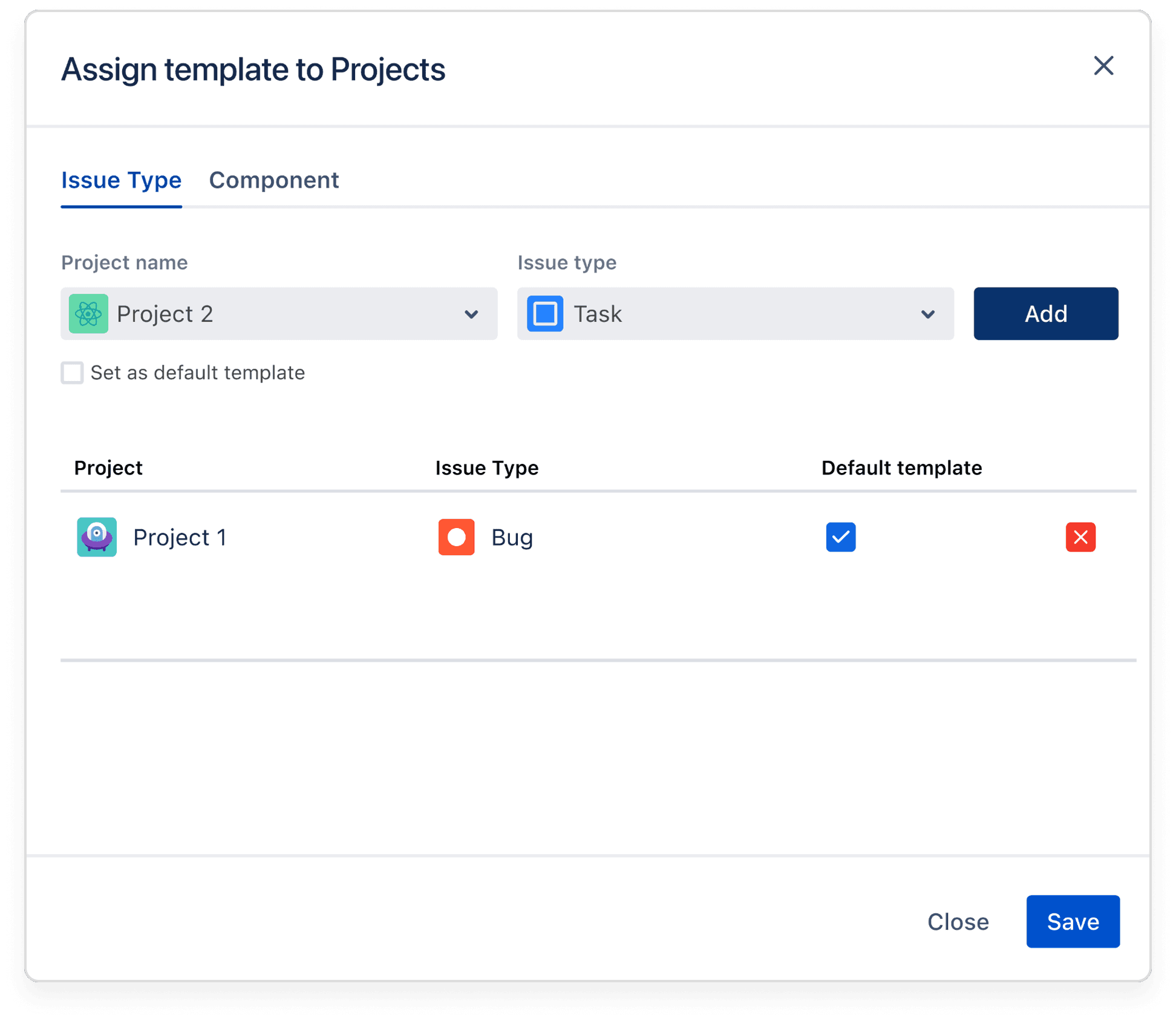
Issue Templates Pro standardizes issue descriptions at the source, letting teams define and apply templates directly on the “Create issue” screen. It removes the need for custom scripts or cloning workarounds, and ensures every issue starts with the same structure across multiple projects.
Highlights:
★ Easy template creation without scripting or workflow hacks
★ Applies templates on the create screen for immediate consistency
★ Project admins can manage templates without involving Jira admins
Pricing:
➔ Free up to 10 users
➔ Paid tiers scale per users
➔ Installs: 5,239
➔ Developer: Decadis AG
➔ Cloud Fortified; Partner Supported; Cloud Migration Assistance
Jira Workflow Toolbox extends transitions into conditions, validators, post functions, and powerful expressions, allowing admins to control how issues move between states and enforce required data without code. It’s designed to help teams implement workflow logic that matches real-world dependencies.
Highlights:
★ Intuitive configuration with examples and auto-complete
★ Strong support for conditional logic and math expressions
★ Useful for enforcing transition rules and field requirements
Pricing:
➔ Free up to 10 users
➔ Flat fee of $20/month for advanced features
➔ Installs: 15,171
➔ Developer: Stiltsoft Europe OU
➔ Cloud Fortified; Partner Supported; Cloud Migration Assistance
This app turns Jira pages into interactive reporting spaces where users can filter tables, build pivot views, visualize data with charts, and work with spreadsheet-like tools directly. It helps teams unify reporting without leaving their documentation workspace.
Highlights:
★ Powerful table filtering, pivoting, and charting
★ Supports combined tables and data from multiple sources
★ Replaces external spreadsheets for many reporting use cases
Pricing:
➔ Free up to 10 users
➔ Flat fee of $9.60/month for advanced features
➔ Installs: 4,845
➔ Developer: Midori Consulting Kft.
➔ Cloud Fortified; Partner Supported; Cloud Migration Assistance
Better PDF Exporter gives teams a reliable way to turn issues, filters, reports, and worklogs into polished PDFs that match internal or external documentation standards. It removes the manual copy-paste overhead by exploring every issue detail, including comments, attachments, change history, and linked issues.
Highlights:
★ Highly customizable PDF templates for reports, issue lists, and artifacts
★ Captures every issue detail (including attachments, SLAs, and worklogs)
★ Automation support via Better PDF Automation for scheduled export emails
Pricing:
➔ Free up to 10 users
➔ Paid tiers scale per users
Best Jira plugins for epic and story management in 2026
The best Jira apps for epic and story management make your backlog readable and predictable across projects:
➔ Epics share a consistent narrative and structure
➔ Links between epics, stories, and all tasks are easier to maintain
➔ Stories include the same core details, so devs and QAs don’t have to guess
➔ Installs: 337
➔ Developer: CloseIT s.r.o.
➔ Partner Supported; Cloud Migration Assistance
This app adds a simple navigation panel that lets teams move between sibling subtasks or issues without constantly reloading the page. It also gives a quick visual overview of how much work is complete, how much has been logged, and whether estimates still match reality.
Highlights:
★ Useful for teams with large epics or deep task hierarchies
★ Fast switching between related subtasks without page reload
★ Clear progress overview for epics (story points, logged work, resolution ratio)
Pricing:
➔ Free up to 10 users
➔ Paid tiers scale per users
➔ Installs: 3,016
➔ Developer: Midori Consulting Kft.
➔ Cloud Security Participant; Partner Supported
Story Maps for Jira gives teams a visual map of epics, activities, and stories so they can plan releases, spot gaps, and prioritize work based on customer journeys. It replaces spreadsheet-style planning with a drag-and-drop board that mirrors how people actually experience the product.
Highlights:
★ Intuitive visual mapping of user activities, epics, and stories
★ Quick drag-and-drop planning for sprints and releases
★ Ability to create and edit issues directly from the map
Pricing:
➔ Free (Cloud)
➔ Installs: 243
➔ Developer: Agilemove Inc
➔ Cloud Fortified; Partner Supported; Cloud Migration Assistance
This AI-driven tool analyzes an epic and converts it into a structured version with hypotheses, outcomes, and consistent acceptance criteria; then automatically generates multiple user stories, test cases, and even test data.
Highlights:
★ Generates test cases and test data to speed up QA preparation
★ Automatically creates structured user stories and acceptance criteria
★ Supports custom LLM configurations for privacy and enterprise alignment
Pricing:
➔ Free up to 10 users
➔ Paid tiers scale per users
Best Jira plugins for time tracking and timesheets in 2026
There are a few things that the most popular time tracking Jira apps have in common:
➔ They make logging time in Jira quick enough that people actually do it
➔ They provide reliable reports for finance, resourcing, and forecasting
➔ They align workflows with estimates, sprints, or billing periods
➔ Installs: 1,204
➔ Developer: Teamline Inc
➔ Partner Supported
AI Scrum Master brings time logging, task updates, and check-ins directly into Slack and Microsoft teams, ensuring teams capture real activity without separate tools or manual reminders. Its AI layer turns those inputs into timesheets, progress insights, and sprint-level summaries.
Highlights:
★ AI-generated insights help teams detect trends and gaps quickly
★ Time tracking happens inside Slack/MS Teams, not in separate tools
★ Interactive timeline improves transparency around workload and estimates
Pricing:
➔ Free (Cloud)
➔ Installs: 4,826
➔ Developer: OBSS
➔ Cloud Fortified; Partner Supported; Cloud Migration Assistance
Timepiece calculates time in status, cycle time, lead time, and other key flow metrics that reveal how and where teams lose momentum. Its exports and dashboards make it easy to analyze patterns across sprints, teams, or long-running projects.
Highlights:
★ Exports to Excel, Google Sheets, Power BI, and easyBI
★ Detailed time-in-status, cycle time, and lead-time reporting
★ Supports scheduled report and alerts for ongoing monitoring
Pricing:
➔ Free up to 10 users
➔ Paid tiers scale per users
➔ Installs: 1,546
➔ Developer: DevSamurai
➔ Cloud Fortified; Partner Supported
DevSamurai’s resource planner unifies capacity planning, worklog tracking, skill profiles, and billable hours into a single system inside Jira. It gives managers a clearer view of availability, planned work, and costs while letting teams log hours with minimal friction.
Highlights:
★ Strong capacity planning views (calendar, workload, skills)
★ Built-in timesheets, stopwatch timer, and approval workflows
★ Useful for billable hours, invoicing, and services-oriented teams
Pricing:
➔ Free up to 10 users
➔ Paid tiers scale per users
Best free Jira plugins in 2026
➔ Installs: 781
➔ Developer: Meetical
➔ Partner Supported
This app pulls every Confluence task into a single Jira dashboard, eliminating the need to jump between tools just to check what’s overdue or still open. It also embeds Confluence pages and adds calendar-based views, making it easier to surface blockers and deadlines across projects.
Highlights:
★ Centralized dashboard for all Confluence tasks
★ Calendar gadget with task reminders and iCal/ICS sync
★ Embeds Confluence pages directly inside Jira dashboards
➔ Installs: 534
➔ Developer: Almarise
➔ Partner Supported; Cloud Migration Assistance
SLA PowerBox lets teams define when SLAs start, pause, resume, or stop based on real workflow logic, giving service, support, and operations teams tighter control over deadlines and expectations.
Highlights:
★ Flexible SLA conditions and terms
★ Dynamic deadlines based on custom fields
★ Works across Jira Software, JWM, and JSM-style setups
➔ Installs: 10,974
➔ Developer: Bloompeak
➔ Cloud Fortified; Partner Supported
This app adds customizable charts and table views so teams group issues by sprint, assignee, status, components, or time-based fields; and build clearer dashboards without external BI tools.
Highlights:
★ Groups data by almost any Jira field
★ Highly flexible charting for dashboards
★ Configurable X/Y axes and aggregations
➔ Installs: 34,627
➔ Developer: HeroCoders
➔ Cloud Fortified; Partner Supported
Checklists for Jira adds lightweight, structured action items you can create instantly inside an issue. It helps teams ensure consistent Definition of Done, QA steps, and checkable requirements without inflating the backlog.
Highlights:
★ Zero-setup checklists built directly in issues
★ Reusable templates for recurring workflows
★ Supports mentions, due dates, Markdown, emojis, and multiple checklists
➔ Installs: 10,017
➔ Developer: Bloompeak
➔ Cloud Fortified; Partner Supported; Cloud Migration Assistance
Status Time Reports Free calculates durations based on customizable calendars and lets teams group by fields or statuses to understand where work slows down. It’s a simple way to track cycle time or identify bottlenecks without introducing paid reporting tools.
Highlights:
★ Rich field-based grouping and time-in-status reporting
★ Supports multiple custom working calendars
★ Multi-language support
The smart way to choose the best Jira plugin for your team: Avoid bloat, keep control
Before you browse dozens of Jira apps, the core decision is whether to install anything at all. Here’s a practical way to evaluate every candidate, whether it’s a bestseller or a niche app someone found through a Reddit thread.
Start by checking what Jira already offers
Before adding another Jira app, you should benchmark Jira’s native capabilities. See whether a combination of workflows can solve the problem, or if Jira automation can cover the gap with a handful of simple rules.
If the answers are “No”, or “Yes, but with a ton of effort”, proceed with your search.
Apply a security and compliance filter
For anything beyond a small internal instance, prefer Cloud Fortified apps or vendors that clearly document SOC 2, GDPR, and other key standards for security, reliability, and data protection.
Test in a safe environment before a company-wide rollout
Theat the critical Jira plugins like any other change to an essential system:
➔ Install them in a staging or test instance first
➔ Check performance impact, automation behavior, or any side effects
➔ Run a short pilot with one or two teams before making it the standard
Within Jira, teams can perform test management to ensure maximum coverage before rolling out changes. This helps validate updates in a controlled environment and reduces risks before company-wide deployment.Define ownership and review cycles
Every Jira app you safely install should have an owner responsible for configuration and support, a scope of work, and a review cadence (for example, every 6 or 12 months).During reviews, check actual usage, support load, and whether Jira’s native features have caught up. Some apps will become core infrastructure. Others can be retired before they accumulate technical debt.
Define ownership and review cycles
Every Jira app you safely install should have an owner responsible for configuration and support, a scope of work, and a review cadence (for example, every 6 or 12 months).During reviews, check actual usage, support load, and whether Jira’s native features have caught up. Some apps will become core infrastructure. Others can be retired before they accumulate technical debt.
The best plugins for Jira do their job quietly — and that’s the point
For Jira admins and team leads, the top Jira apps are the ones that eliminate the problems you otherwise keep patching sprint after sprint.
They make planning clearer, more predictable. Reporting starts to reflect reality instead of approximated guesses. Time tracking stops requiring detective work. And automation rules are not breaking constantly anymore due to inconsistent inputs.
While we tried surfacing some of the best Jira add ons, the truth is that there’s no universal list that fits every company’s needs. But, there is a reliable way to choose the right ones.
Start with real workflow problems, apply security and compliance filters, test safely, and govern apps like any other important tool. In the end, your Jira plugins should solve specific pains without adding complexity or effort.

Nar is the founder of Narva Software and a former software developer with real-world experience using Atlassian tools. After facing the limitations of Jira and Confluence himself, he set out to build simple, effective apps that make teamwork easier. Today, his focus is on creating practical solutions that help teams work faster and smarter — and are trusted by companies around the world.